I Just Wanted to Find a CLI Plugin. Then I Realized the Whole Ecosystem Has a Discovery Problem.
It started with a simple question: Where do I find Salesforce CLI plugins? Not the handful that Salesforce ships out of the box. The community ones. The ones developers build...
It started with a simple question: Where do I find Salesforce CLI plugins?

Not the handful that Salesforce ships out of the box. The community ones. The ones developers build because they hit a wall with sfand decided to do something about it. The plugin that bulk-deletes scratch orgs you forgot about. The one that generates test data without making you write a factory class first. The one that turns metadata retrieval into something that doesn’t make you question your career choices.
These tools exist. Developers are building them. They’re on GitHub, on npm, occasionally mentioned in a conference talk or a Discord thread that scrolls off the screen by Tuesday. But there’s no central place to find them. No registry. No catalog. No “here’s what the community has built, go browse.”
You’re left with a workflow that looks something like this:
- Google it. Get results from when Lightning Experience was still optional.
- Ask in a Slack community. Wait. Hope.
- Someone shares a GitHub link. The README says “WIP.” Last commit: 14 months ago.
- Find a different one through a retweet of a retweet. It actually works. You bookmark it in a folder you’ll never open again.
- A colleague asks you the same question three months later. You do not remember the name of the plugin.
This is not a system. This is chaos with bookmarks.
The Problem Is Bigger Than CLI Plugins
Once you start pulling on this thread, it unravels quickly. The discovery gap isn’t limited to CLI tools. It’s everywhere.
You’ve got Lightning Web Components buried in blog posts that may or may not still compile. Apex utility classes living in someone’s gist, three forks deep, with zero documentation and a commit message that just says “fixed stuff.” Agentforce extensions mentioned once in a webinar and never seen again. Experience Cloud components that could save you from building a portal pixel by pixel, if you could find them.
The community is producing all of this. Prolifically. But there’s no single place that ties it together. The tools are scattered across personal GitHub repos, npm packages with 40 downloads, blog posts that rank on page three of Google, and unlisted YouTube videos with surprisingly good content and absolutely zero SEO.
The Salesforce developer ecosystem has a discovery problem, not a talent problem.
A Note on What Already Exists
This is explicitly not a dig at existing resources. UnofficialSF is an invaluable community resource. It’s done incredible work cataloging Flow Screen Components and giving Flow builders a home to find and share what they’ve created. If you build Flow components, you should absolutely be using it.
But UnofficialSF’s focus is primarily Flow Screen Components. It was never designed to be a general-purpose registry for every type of community-built Salesforce tool. That’s not a criticism; it’s a scope decision, and the right one for what it set out to do.
The gap is everything around it. The CLI plugins, the LWC libraries, the Apex frameworks, the Agentforce tools, the Experience Cloud components. The full breadth of what Salesforce developers build and share. That’s the space no one was covering.
So… I Built SFDX Hub
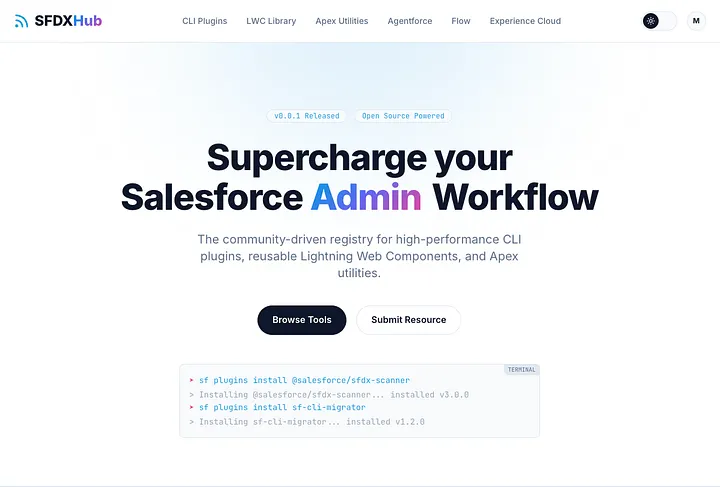
SFDX Hub is a community-driven registry that covers the full spectrum of Salesforce developer resources. Not just one category, all of them:
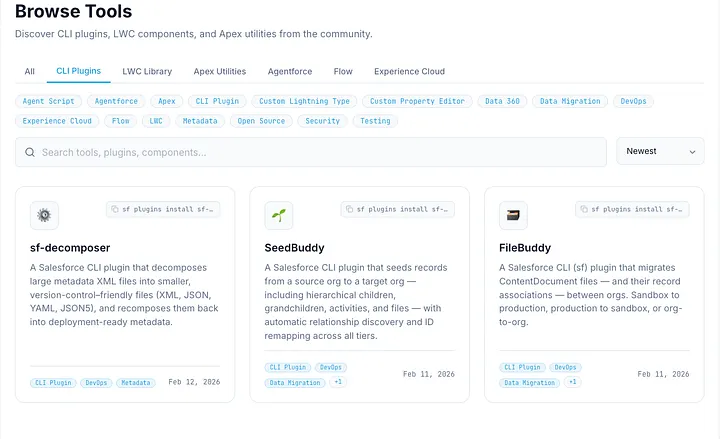
- CLI Power-Ups - The pain point that started this whole thing. Browse community-built plugins, see the install command right on the card. One click to copy, paste into your terminal. Boom. Done.
- LWC Blueprints - Drop-in Lightning Web Components you can pull into your org instead of rebuilding the same data table for the fourteenth time.
- Apex Utilities - Battle-tested classes, frameworks, and helpers. The kind of code you wish came standard but doesn’t.
- Agentforce - AI-powered agent tools and Agent Scripts for the platform’s newest frontier.
- Flow - Automation components and templates. A complement to what UnofficialSF already does well, not a replacement.
- Experience Cloud - Portal and community components, because building Experience Cloud from scratch is a punishment no one deserves.
Think of it as the missing package registry the Salesforce ecosystem never got around to building.
Every listing links to the source repository, documentation, and npm package where applicable. Tags make filtering practical. No algorithm deciding what you see. No pay-to-play promoted listings. No enterprise sales team reaching out to “align on synergies.” Just tools, organized cleanly, submitted by the people who built them (or by me, because I am a BIG FAN and think the projects deserve spotlights)
Supplementing, Not Competing
This point is worth making clearly: SFDX Hub isn’t trying to replace anything. UnofficialSF serves its community well. Salesforce Labs does its thing. Trailhead has its role.
SFDX Hub is meant to fill the gap between all of them, to be the connective tissue for the Salesforce developer tools that don’t have a natural home. The CLI plugin living in a personal repo with 8 stars. The LWC component library someone built for their team and open-sourced quietly. The Apex utility that’s been copy-pasted across a dozen orgs but never properly cataloged.
Those tools deserve to be findable. The developers who build them deserve visibility. And the rest of us deserve to stop re-Googling the same thing every quarter.
Get Involved
Browse. Head to https://sfdxhub.com/browse and see what’s already been submitted. Filter by category, sort by tags, and find something you didn’t know existed. You’ll probably turn up something useful in the first sixty seconds.
Submit. That tool you built? The one sitting in your GitHub with a solid README and zero marketing? Sign in with GitHub, fill out the form, and put it on the registry. Submissions are reviewed to keep quality high (this isn’t a dumping ground) but the goal is to surface what the community is actually building. Someone is searching for exactly what you made.
Share. The next time someone in your org asks “does anyone know a good _____ for Salesforce?”, send them to sfdxhub.com instead of digging through your browser history. Bonus points if you link directly to the tool! ;)
The Salesforce community builds exceptional tools. It’s time they were easy to find.